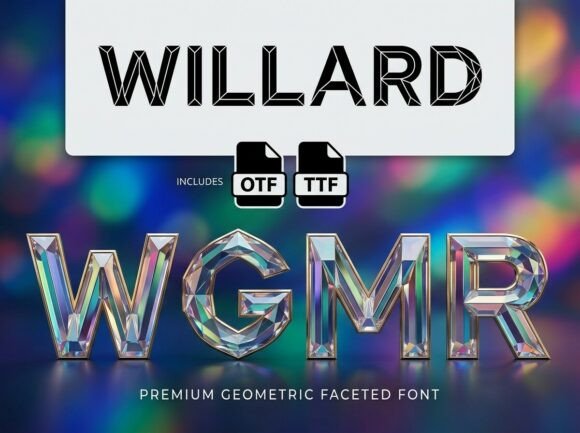
Willard: A Bold Display Font for Web Design
When working on a boutique online store, I was looking for a font that could command attention without overwhelming the design. Willard stood out as a strong candidate—its artistic flair and visual presence made it perfect for headlines and banners. Testing it in the hero section of the site, I immediately noticed how it added a sense of sophistication and creativity to the layout.
Visual Characteristics and Personality
Willard is a decorative display font with a unique artistic edge. It features intricate details and a bold, confident structure that makes it ideal for high-impact text. The font has a modern yet timeless feel, blending elegance with a touch of whimsy. Its personality is both playful and professional, making it versatile for a range of digital projects.
One of the first things I noticed was how Willard performed against different backgrounds. On a dark background, it retained its clarity and contrast, while on light or image-heavy sections, it still managed to stand out without clashing. This versatility made it a great choice for a variety of web elements, from headers to call-to-action buttons.
Use Cases in Web Design
I used Willard in several areas of the site, including the main navigation, product titles, and promotional banners. In each case, it brought a sense of style and cohesion to the overall design. For example, placing it over an image banner gave the page a more editorial feel, while using it in the header helped establish a clear visual hierarchy.
For a coaching website, I paired Willard with a clean sans serif font for body copy. This combination allowed the decorative font to shine in headings and titles while keeping the rest of the content easy to read. The result was a balanced design that felt both creative and professional.
Readability and User Experience
Readability was a key concern when testing Willard. I checked how it looked on mobile screens, small buttons, and dark backgrounds. While it’s not suitable for long blocks of text, it worked well in short phrases, logos, and decorative accents. On smaller screens, I adjusted the font size slightly to ensure it remained legible without losing its visual impact.
Willard also affected user scanning behavior. Its bold strokes and distinct shapes drew the eye quickly, making it effective for guiding users through the site. This was especially useful for CTA buttons and key messages, where clarity and emphasis were important.
Font Pairing and Design Assets
Pairing Willard with other fonts was an important part of the design process. I experimented with a few options, ultimately settling on a simple sans serif for body text. This pairing created a nice contrast between the decorative and functional elements of the site. It also helped maintain a cohesive brand identity across different pages and sections.
Before using Willard, I checked its available styles, weights, and file formats. It came with multiple variations, which gave me flexibility in different design scenarios. I also made sure it supported multilingual characters, as the site had content in multiple languages. Commercial licensing was straightforward, which was a relief for a project with client-facing assets.
Applying Willard to Different Projects
Willard proved to be a valuable addition to a creative portfolio site. Using it for project titles and section headings gave the site a polished, professional look. It also worked well in blog graphics and social media posts, where visual appeal was important.
On a product landing page, I used Willard for the headline and key selling points. The font’s strong personality helped convey the brand’s message effectively. It also complemented the site’s imagery and color scheme, creating a more immersive experience for visitors.
For a campaign landing page, I incorporated Willard into the main CTA. The font’s boldness made the button stand out, encouraging users to take action. It also helped reinforce the brand’s identity, making the page feel more cohesive and intentional.
Conclusion
Willard is a powerful tool for web designers and digital creators looking to add visual interest and personality to their projects. Its unique style and strong presence make it ideal for headlines, logos, and decorative elements. While it’s not meant for large blocks of text, it excels in areas where impact and style are important.
Whether you're working on a boutique store, a coaching website, or a creative portfolio, Willard can help elevate your design and create a more engaging online experience. With proper pairing and thoughtful use, it can become a key part of your brand’s visual identity.